Tutorial: Setting up a new project with EMCqMRI
Folder structure
The folder structure of the project is useful to organize the different modules required by the EMCqMRI. You can start with:
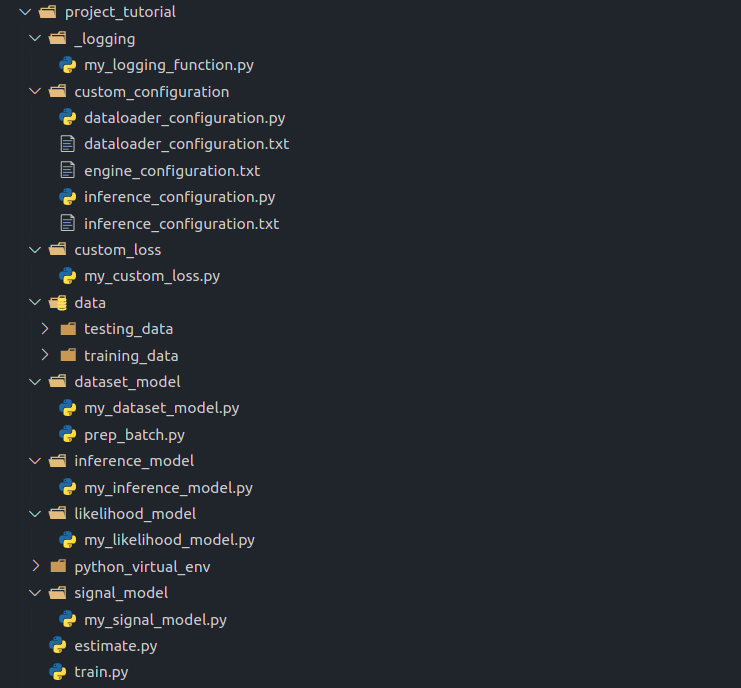 Proposed folder structure
In this way, if you are implementing multiple models per module, they can be put in the same folder.
Creating custom modules
The EMCqMRI requires the implementation of 4 modules: the Signal Model, the Likelihood Model, the Inference Model and a Data Loader.
Signal model
To implement this module, we will use the EMCqMRI API “Signal Model”. This interface provides a way to link your generative forward model to the EMCqMRI. First, create a model file (e.g. my_signal_model.py) within the folder signal_model.
All new implementations of Signal Model should inherit from the base class “EMCqMRI.core.base.base_signal_model.SignalModel”. Two abstract methods should be implemented by you:
from EMCqMRI.core.base import base_signal_model


class MySignalModel(base_signal_model.SignalModel):
    """
        Class implementing the forward model of a parametric signal model.
    """
    def __init__(self, configObject):
        super(MySignalModel, self).__init__()
        self.__name__ = 'MySignalModel'
        self.args = configObject.args
        self.independent_var = []

    def forward(self, dependent_var, *extra_args):
        """ Parametric signal model.

        Example:
            signal = []
            for t in self.independent_var:
                signal.append(torch.exp(dependent_var * t))

            return torch.stack(signal)

        """
        return signal

    def initialize_parameters(self, init_param):
        """ Initialize parameters of the signal model.

        Example:
            dependent_var = torch.autograd.Variable((signal[0].clone(), requires_grad=True) # To be optimized
            self.independent_var = pickle.load(self.args.dataset.timeTablePath) # e.g. Acquisition protocol

        """
        return initialized_variables
Likelihood model
To implement this module, we will use the EMCqMRI API “Likelihood Model”. This interface provides a way to link your likelihood model to the EMCqMRI. First, create a model file (e.g. my_likelihood_model.py) within the folder likelihood_model.
All new implementations of Likelihood Model should inherit from the base class “EMCqMRI.core.base.base_likelihood_model.LikelihoodModel”. Two abstract methods should be implemented by you:
from core.base import base_likelihood_model


class MyLikelihoodModel(base_likelihood_model.Likelihood):
    """
        Class implementing the likelihood model of a parametric signal model.
    """

    def __init__(self, config_object):
        super(MyLikelihoodModel, self).__init__(config_object, self)
        # Passing the config_object to the parent class is required
        # to use the base class implementation of the 'gradients' method.
        self.__name__ = 'MyLikelihoodModel'
        self.args = config_object.args

    def likelihood(self, signal, modeled_signal, *extra_args):
        """ Likelihood model. Commonly defined by the Probability Density Function.

            Example:
                sigma = extra_args[0]
                prob_likelihood = torch.mean((1/2*(sigma**2))*(signal - modeled_signal)**2)
                return prob_likelihood
        """
        return prob_likelihood

    def apply_noise(self, signal, sigma):
        """ Used for apply noise to a signal, with noise level sigma.
            Example:
                noisy_signal += torch.random.normal(0, sigma, signal.size())
        """
        return noisy_signal
Additionally, the base class “EMCqMRI.core.base.base_likelihood_model.LikelihoodModel” offers a built-in implementation of gradient computation based on the automatic differentiation from PyTorch. If you wish to implement your own likelihood gradient method, take a look at the API documentation for more details.
Inference model
To implement this module, we will use the EMCqMRI API “Inference Model”. This interface provides a way to link your inference model to the EMCqMRI. First, create a model file (e.g. my_inference_model.py) within the folder inference_model.
All new implementations of Inference Model should inherit from the base class “EMCqMRI.core.base.base_inference_model.InferenceModel”. One abstract method should be implemented by you:
from core.base import base_inference_model


class MyInferenceModel(base_inference_model.InferenceModel, object):
    """
        Class implementing the inference model for estimation of parameters.
    """
    def __init__(self, configObject):
        super(MyInferenceModel, self).__init__()
        self.__name__ = 'MyInferenceModel'
        self.__require_initial_guess__ = True
        self.args = configObject.args

    def forward(self, input_signal):
        ''' Forward pass of the inference model.

            Example:
                kappa = self.args.engine.signal_model.initialize_parameters(input_signal)

                for _ in range(self.args.inference.inferenceSteps):
                    self.args.engine.optimizer.zero_grad()

                    modeled_signal = self.args.engine.signal_model.forward(kappa)
                    loss = self.args.engine.likelihood_model.likelihood(input_signal, modeled_signal)

                    loss.backward()
                    self.args.engine.optimizer.step()

                    estimates = torch.stack(kappa)
                return estimates
        '''
        return estimates
Data loader
To implement this module, we will use the EMCqMRI API “Dataset”. This interface provides a way to link your data loader to the EMCqMRI. First, create a model file (e.g. my_dataset_model.py) within the folder dataset_model. All new implementations of Dataset should inherit from the base class “EMCqMRI.core.base.base_dataset.Dataset”.
Derived dataset classes implement data loading/generation routines. Here, you should also define the pre-processing and data augmentation pipelines. The base class “EMCqMRI.core.base.base_dataset.Dataset” provides basic methods for indexing of files, setting the data path, batch-loading of files in a folder, loading of individual files and length of the dataset (for more information please check the dataset API documentation). Two abstract methods should be implemented by you:
from EMCqMRI.core.base.base_dataset import Dataset


class MyDatasetModel(Dataset):
    def __init__(self, configObject):
        super(MyDatasetModel, self).__init__()
        self.__name__ = 'MyDatasetModel'
        self.args = configObject.args

    def get_signal(self, idx):
        ''' This method implements the rountines for fetching acquired data.

            Example:
                filename_ = self.filename_list[idx]  #self.filename_list is automatically set
                with open(self.args.engine.trainingDataPath + filename_, 'rb') as file_:
                    self.data_ = pickle.load(file_)

                signal = self.data_['signal']
                return [signal]
        '''
        return [signal]

    def get_label(self, idx):
        ''' This method implements the rountines for fetching training labels.

            Example:
                labels = self.data_['label']  # self.data_ was set in "get_signal()"
                mask = []
                return [labels, mask]
        '''
        return [labels, mask]
The engine calls “get_signal” before calling “get_label”. If the signal and label are in the same file, you can load the file within “get_signal” and assign the label to a class variable “self.label”, which can be returned in “get_label”.
Additional custom modules
Custom loss
The EMCqMRI provides basic loss functions as implemented by PyTorch (MSE, L1, SmoothL1, NLLLoss). If you wish to implement a custom loss function, where multiple loss terms are included, or additional processing of estimates are required, you can.
First, create a file (e.g. my_custom_loss.py) within the folder custom_loss. The structure of my_custom_loss.py should follow:
class CustomLoss(object):
    def __init__(self, config_object):
        self.args = config_object.args
        self.__name__ = "Custom Loss"
        # self.loss_ = torch.nn.MSELoss(reduction='sum')

    def __call__(self, estimate_, label):
        ''' This method implements a custom loss function.

            Example:
                # If 'label' are weighted images, and 'estimate_' are model parameters, we can use the signal model to generate estimated weighted images:

                est_images = self.args.engine.signal_model.forward(estimate_)

                return self.loss_(label, est_images)
        '''
Logging function
You can also implement a logging class that is called after the processing of a data sample is completed. This class can include plotting of images and graphs and creation of Tensorboard dashboards. Create a file (e.g. my_logging_function.py) within the folder logging. The structure of my_logging_function.py should follow:
class LogFun(object):
    def __init__(self, config_object):
        self.args = config_object.args

    def __call__(self, processed_data, loss, sample, epoch):
        ''' This method is called after the processing of each sample.
        It provides information on the loss, sample index and epoch number.

        'processed_data' is a dictionary containing the keys:
        'estimated', 'label', and 'signal'.

            Example:
                print(processed_data['estimated].mean())

                if epoch %10 == 0:
                    plt.figure()
                    plt.imshow(processed_data['estimated][0])
                    plt.show()
                    # Save image

        '''
Custom data preparation
You can also implement a custom function for the preprocessing of your data after it was sampled from your dataloader.This is made available because sometimes the output of the PyTorch dataloader is not compatible with your downstream pipeline. As an example, you can write a function that transfer your batched data to a specific device. Create a file (e.g. “prep_batch.py”) in the folder dataset_model. In that file, implement your custom batch preparation method:
def custom_prep_batch(batchdata, device, non_blocking=False):
    '''
        Example:
            batchdata['image'].to(device=device, non_blocking=non_blocking)
            batchdata['label'].to(device=device, non_blocking=non_blocking)

            return batchdata
The keys of the batchdata dictionary are ‘image’, ‘label’, ‘mask’, and ‘filename’,
Linking custom modules to the EMCqMRI engine
After creating your custom modules, you will need to link them to the EMCqMRI engine. The links are manually added in a method called “override_configuration”. You should create this method within a new “dynamic_link.py” file, placed in the folder custom_configuration. For example, to link the custom modules we created above, we could implement:
def override_configuration(config_object):
    # The function is responsible to link any custom modules you created.

    # Linking your custom signal model to EMCqMRI
    if config_object.args.engine.signalModel == 'custom_signal_model':
        from signal_model import my_signal_model
        config_object.args.engine.signal_model = my_signal_model.MySignalModel(config_object)

    # Linking your custom inference model to EMCqMRI
    if config_object.args.engine.inferenceModel == 'custom_inference_model':
        from inference_model import my_inference_model
        config_object.args.engine.inference_model = my_inference_model.MyInferenceModel(config_object)

    # Linking your custom likelihood model to EMCqMRI
    if config_object.args.engine.likelihoodModel == 'custom_likelihood_model':
        from likelihood_model import my_likelihood_model
        config_object.args.engine.likelihood_model = my_likelihood_model.MyLikelihoodModel(config_object)

    # Linking your custom dataloader model to EMCqMRI
    if config_object.args.engine.datasetModel == 'custom_dataloader':
        from dataset_model import my_dataset_model
        config_object.args.engine.dataset_model = my_dataset_model.MySignalModel(config_object)

    # Linking your custom loss to EMCqMRI
    if config_object.args.engine.lossFunction == 'custom_loss':
        from custom_loss import my_custom_loss
        config_object.args.engine.objective_fun = my_custom_loss.CustomLoss(config_object)

    # Linking your custom logging function to EMCqMRI
    if config_object.args.engine.logging:
        from logging import my_logging_function
        config_object.args.engine.log_training_fun = my_logging_function.LogFun(config_object)

    # Linking your custom batch preparation function to EMCqMRI
    if config_object.args.engine.prepBatch:
        from dataset_model import prep_batch
        config_object.args.engine.prepare_batch = prep_batch.custom_prep_batch

    return config_object
For more information on the configuration files and the configuration object “config_object”, see our documentation on Configuration Files.
The train.py and estimate.py files
Now, we need to create the routine that will build the EMCqMRI core and link your custom modules to the engine. If you are training a neural network, the “train.py” file should be created and look like this:
from EMCqMRI.core.engine import build_model as core_build
from custom_configuration import dynamic_link

if __name__=='__main__':
    configurationObj = core_build.make('training', dynamic_link.override_configuration)
    configurationObj.args.engine.trainer.run()
To run the EMCqMRI in inference (testing) mode, you will need to create the “estimate.py” file. Its structure should be:
from EMCqMRI.core.engine import build_model as core_build
from custom_configuration import dynamic_link

if __name__=='__main__':
    configurationObj = core_build.make('testing', dynamic_link.override_configuration)
    configurationObj.args.engine.estmator.run()
Running your method
To be able to run your newly implemented method, the EMCqMRI needs a set of configurations. For more information on the configuration files and the configuration object “config_object”, see our documentation on Configuration Files.